Baby sleep sounds that fade out instead of stopping.
Heartbeat, womb, shush, white noise, rain and lullabies — 31 sounds your baby already knows, a timer that lowers the volume gently, and a recorder for your own voice. Free on Android, no subscription, no account.
- 31
- sounds, 6 categories
- 1 tap
- from open to playing
- ≤ 50 dB
- AAP volume guide built in
The sounds
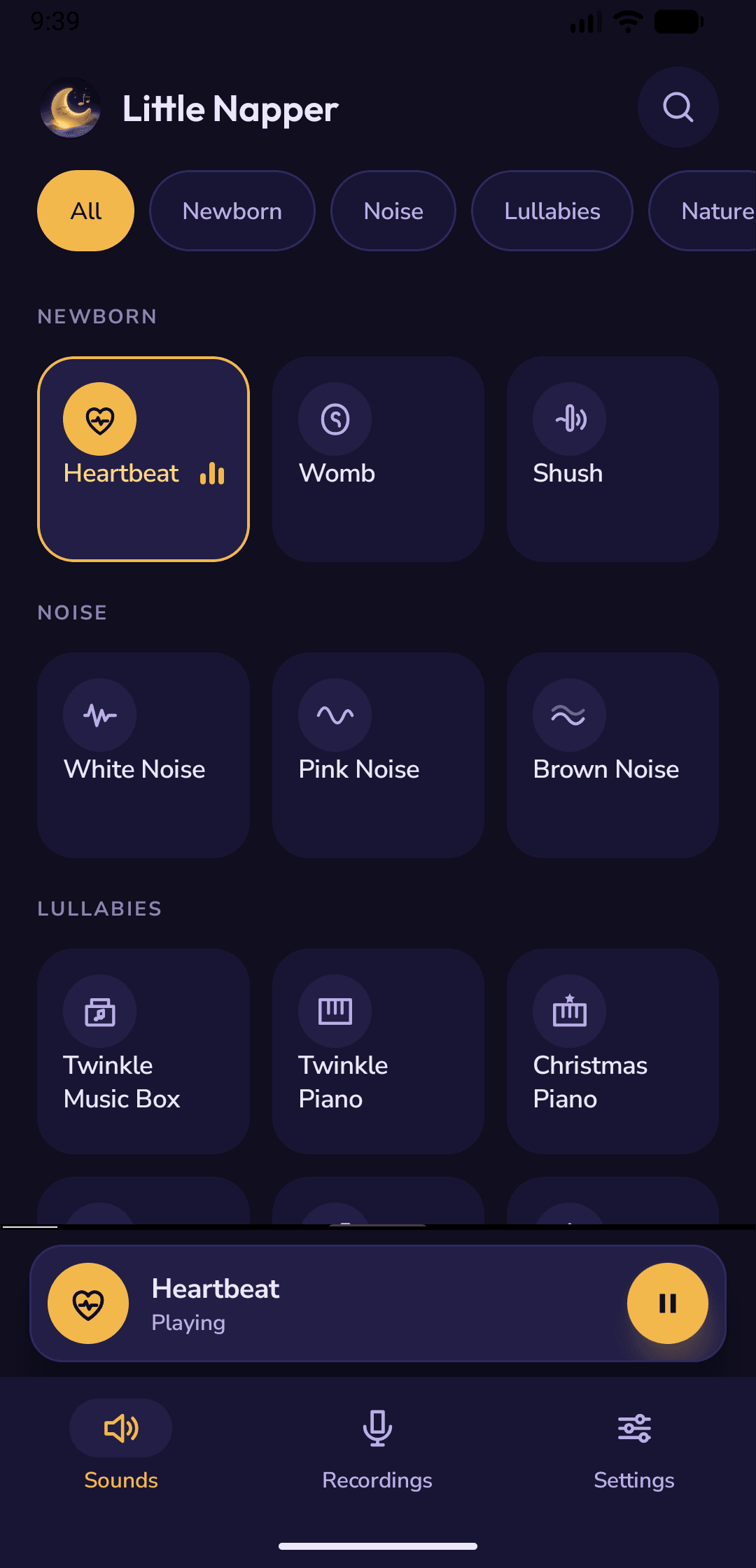
31 sounds, Newborn first
Every sound is bundled with the app and prepared for gapless looping, so there is no download, no buffering and no click at the end of the file. The Newborn row is at the top because it is the row you need at 3 a.m.
Newborn
3What the womb sounded like — the three sounds newborns settle to fastest.
- Heartbeat
- Womb
- Shush
Noise
3Steady, broadband sound that masks the house.
- White noise
- Pink noise
- Brown noise
Lullabies
6Soft music boxes and piano, looped without a gap.
- Twinkle (music box)
- Twinkle (piano)
- Gentle lullaby
- Baby sleep
- Silent Night
- Christmas piano
Nature
10Rain, ocean and the quiet outdoors.
- Rain
- Ocean
- Waves
- Waterfall
- Forest
- Birds
- Crickets
- Fire
- Wind
- Cat purring
Home
6The hum babies already fall asleep to.
- Fan
- Hairdryer
- Washing machine
- Fridge
- Air conditioning
- Clock
Travel
3The motion sounds that work in a car seat.
- Car ride
- Train
- Airplane
Bedtime, in three taps
How does Little Napper work?
Tap a sound
Open the app and tap a tile. It plays at once, loops without a gap, and the mini player appears at the bottom. No account, no setup screen, no download.
Set the timer
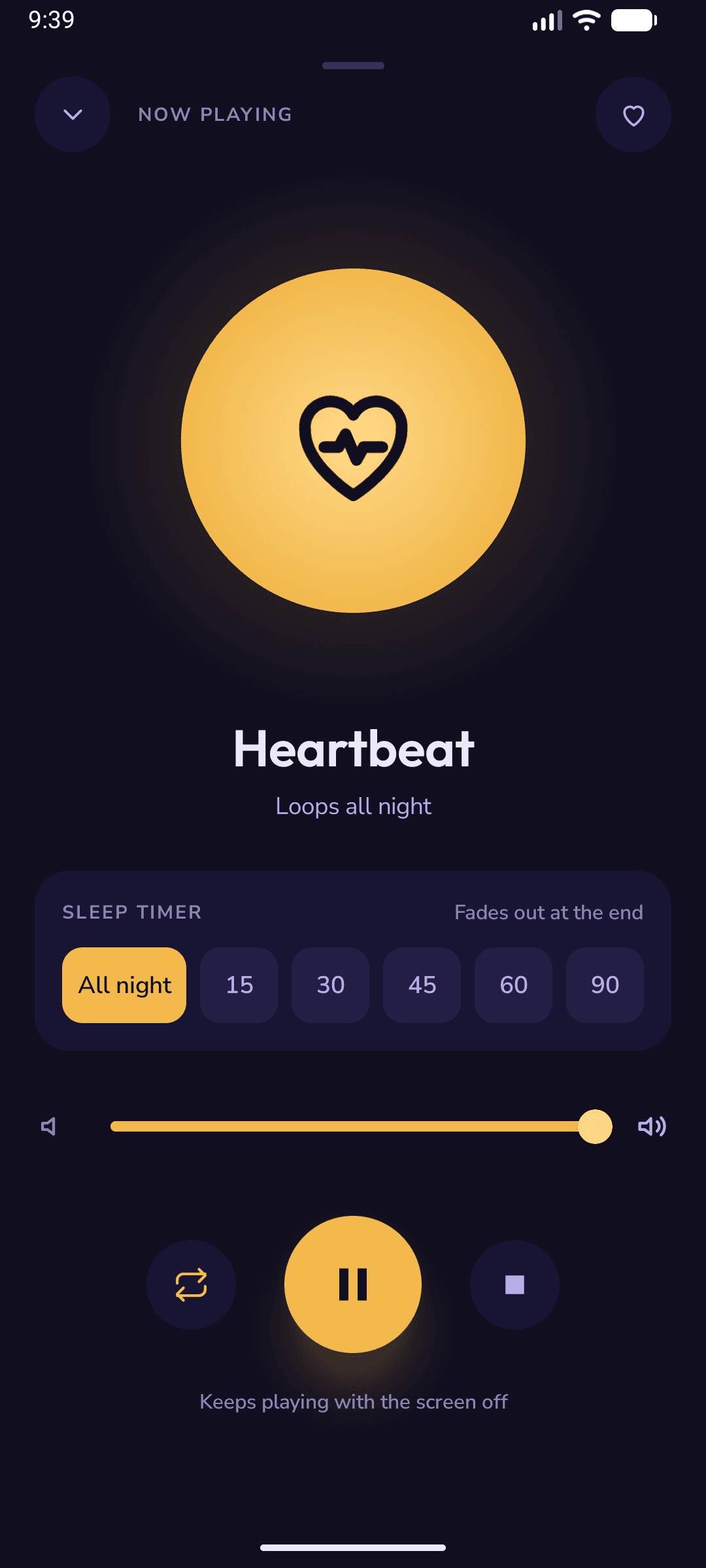
Tap the mini player for the Now Playing screen: 15 to 90 minutes or All night. The volume fades out over the last minutes so the silence never startles.
Put the phone down
Screen off, phone on a shelf 7 feet from the crib. Playback keeps going in the background; pause and stop live on the lock screen and in the notification.
Why Little Napper
Built for the nursery, not the app store chart
Made by a parent who wanted one thing: a sound that starts in one tap, keeps playing with the screen off, and ends without waking anyone.
A timer that fades out
Most sound apps stop dead when the timer ends — and a sudden silence is itself a change a light sleeper notices. Little Napper lowers the volume over the last minutes of the timer, then restores it for next time. Pick 15, 30, 45, 60, 90 minutes or All night; the Now Playing screen shows the exact time the sound will end.
Record your voice
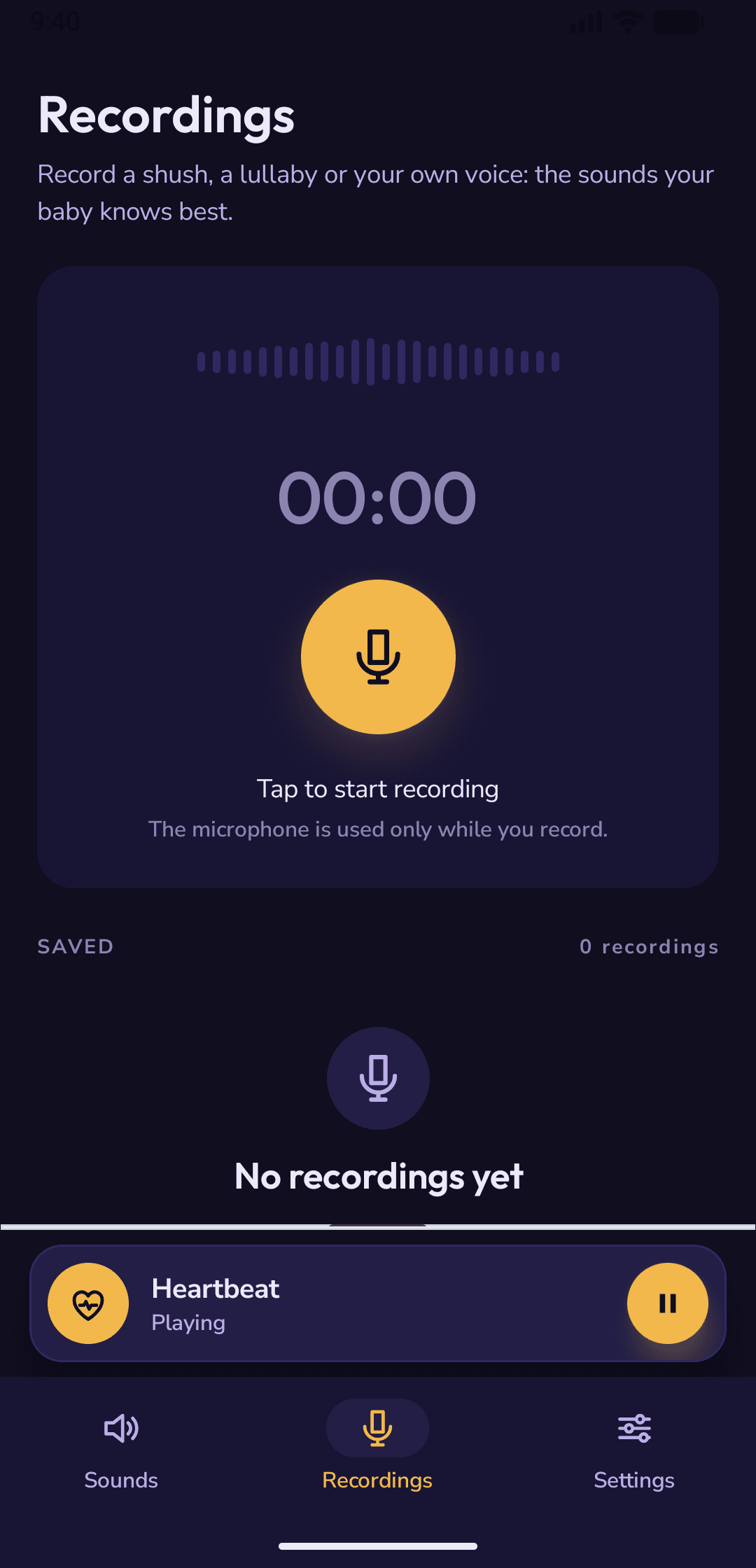
Your shush, your lullaby, your "it's okay". Record it once and play it like any other sound. Recordings never leave the phone.
Works offline
Every sound is built in. Airplane mode, a cabin with no signal, a nursery in the basement — it plays.
Screen off, controls on the lock screen
Playback runs as a background service that survives the screen turning off, the phone locking and Android's battery saver. Pause, play and stop from the lock screen, the notification shade or the home-screen widget — without lighting up the room. The screen can also dim itself while a sound plays.
Gapless loops, favourites, search
No click at the loop point. Heart a sound to pin it to the top of the screen; search by name when the list gets long.
Free. Actually free.
No subscription, no locked sounds, no account. The app is supported by ads — a small banner, and the occasional full-screen ad held back during night hours — and a sound that has started keeps playing.
In the app
Designed for a dark room at 3 a.m.
Big tap targets, a calm palette and nothing that flashes. Everything you need while the baby is in your other arm.
- One screen for the whole nightTimer presets, a live volume slider, loop and favourite — all on the Now Playing screen, with the exact time the sound will end.
- A breathing orb, not a blinking oneThe screen is designed to be looked at in the dark: deep night surfaces, one warm accent, nothing bright.
- Dark by default, light if you preferDark mode is the primary design. A light theme is one switch away in Settings.
Safe volume
Three rules for baby sleep sounds
In a 2014 study in Pediatrics, 14 of 14 infant sound machines tested could exceed 50 dB at 30 cm, and three passed 85 dB — louder than heavy traffic. The device is not the problem; the volume and the distance are. These are the rules the app is designed around.
The American Academy of Pediatrics' guidance for infant sleep sound: no louder than 50 decibels measured where the baby sleeps — quieter than a shower. Little Napper starts at a moderate volume and remembers what you set.
Place the phone at least 7 feet (2 m) from the crib, never on the rail or in the cot. Sound falls off quickly with distance, which is what keeps a soothing level from becoming a loud one.
Use sound for naps and nights, not as constant background. Babies learn language from hearing speech clearly, and their ears need quiet hours too.
Sources: American Academy of Pediatrics, HealthyChildren.org; Hugh SC et al., "Infant Sleep Machines and Hazardous Sound Pressure Levels", Pediatrics 2014. This page is general information, not medical advice — ask your paediatrician about your own baby.
Guides by sound
Which sound does your baby need tonight?
What each sound does, when it works best, how loud to play it, and how to set it up in the app — one page per sound.
FAQ
Questions parents ask before installing
Short, honest answers. Each sound guide has its own FAQ for the details.
Is Little Napper really free?
+
Yes. All 31 sounds, the timer with fade-out, the recorder, favourites and the widget are free. There is no subscription, no trial and no account. The app is supported by ads: a small banner, plus an occasional full-screen ad that is held back during night hours. A sound that has started keeps playing.
Does it keep playing with the screen off?
+
Yes. Playback runs as a background service, so you can lock the phone and put it on a shelf. Pause, play and stop are on the lock screen, in the notification shade and on the home-screen widget.
How many decibels should baby sleep sounds be?
+
The American Academy of Pediatrics recommends no more than 50 dB measured at the crib (cot), with the speaker at least 7 feet (2 m) away, and using sound for sleep rather than all day. Little Napper starts at a moderate volume and remembers your setting.
Does the timer stop the sound suddenly?
+
No. Over the last minutes of the timer the volume fades out gently, then the sound stops. A sudden silence can wake a light sleeper; the fade is there to avoid it. You can also choose All night.
Can I record my own voice?
+
Yes. The Record tab captures your own shush, lullaby or a few calming words, and the recording plays like any other sound — looped, timed and favourited. Recordings stay on your phone and are never uploaded.
Does it work offline?
+
Yes. Every sound is built into the app, so it works in airplane mode, in the car and anywhere without signal.
Is it on iPhone?
+
Little Napper is an Android app on Google Play. There is no iOS version yet.
Guides
Guides for tired parents
Tonight, in one tap.
Free on Google Play. 31 sounds, a timer that fades out, your own voice — and no subscription, ever.